Label AI images in WordPress — on the page and inside the file
A plugin that adds a visible badge to AI-generated images and writes the same notice into the file itself as machine-readable metadata — XMP and IPTC, Digital Source Type. JPEG, PNG and WebP.
14-day trial, no card required. Interface in seven languages.

01 — The date
From 2 August 2026
Since this date the transparency obligations of Article 50 of the EU AI Act have applied. Who they affect, and to what extent, depends on your role and on the type of content — that is a question for your lawyer. This plugin covers the technical side: the labelling itself, visible and machine-readable.
02 — How it works
What the plugin does
- 01
Visible badge
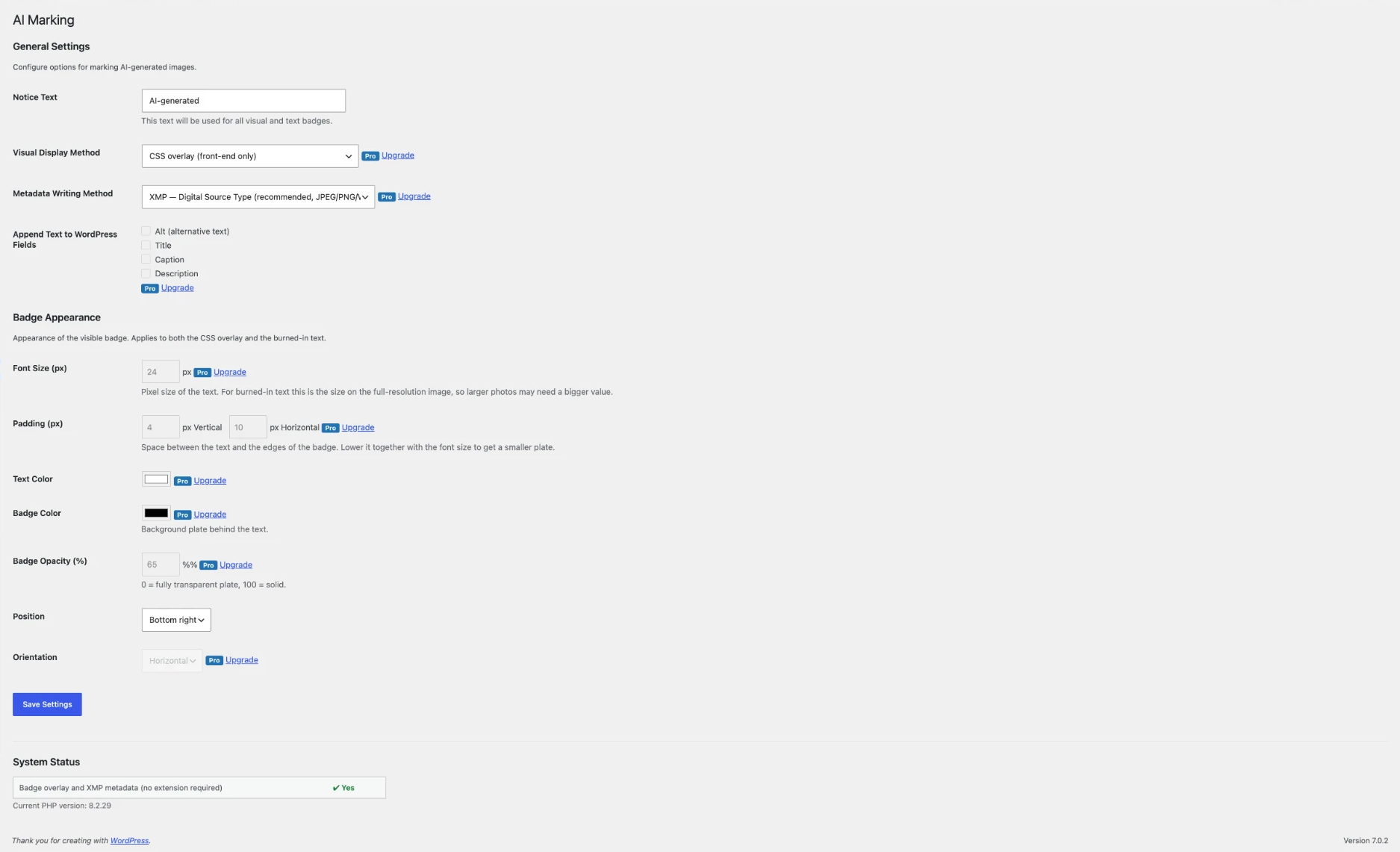
A notice badge sits on top of the image — in posts, galleries and on block background images. The file itself stays untouched. Any text you like; the default is “AI-generated”, and German sites start with “KI-generiert” automatically.
- 02
Label inside the file
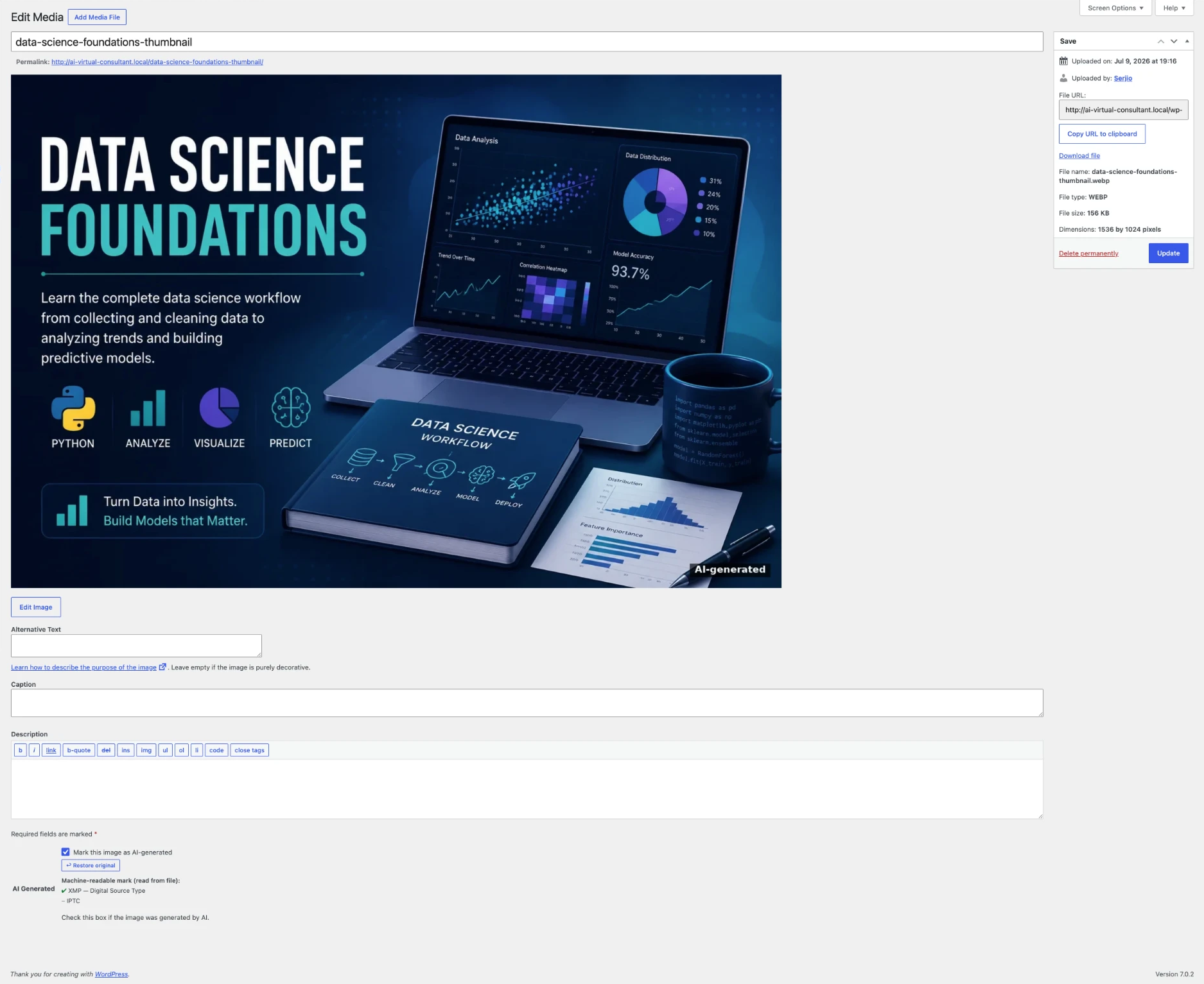
The notice is written as XMP and IPTC metadata — Digital Source Type per the IPTC standard. It stays with the image even after someone downloads and shares it.
- 03
Burn into the image
When the label needs to travel with the picture everywhere, the plugin burns the text into the pixels. The original is backed up first and restored with one click.
- 04
The whole media library at once
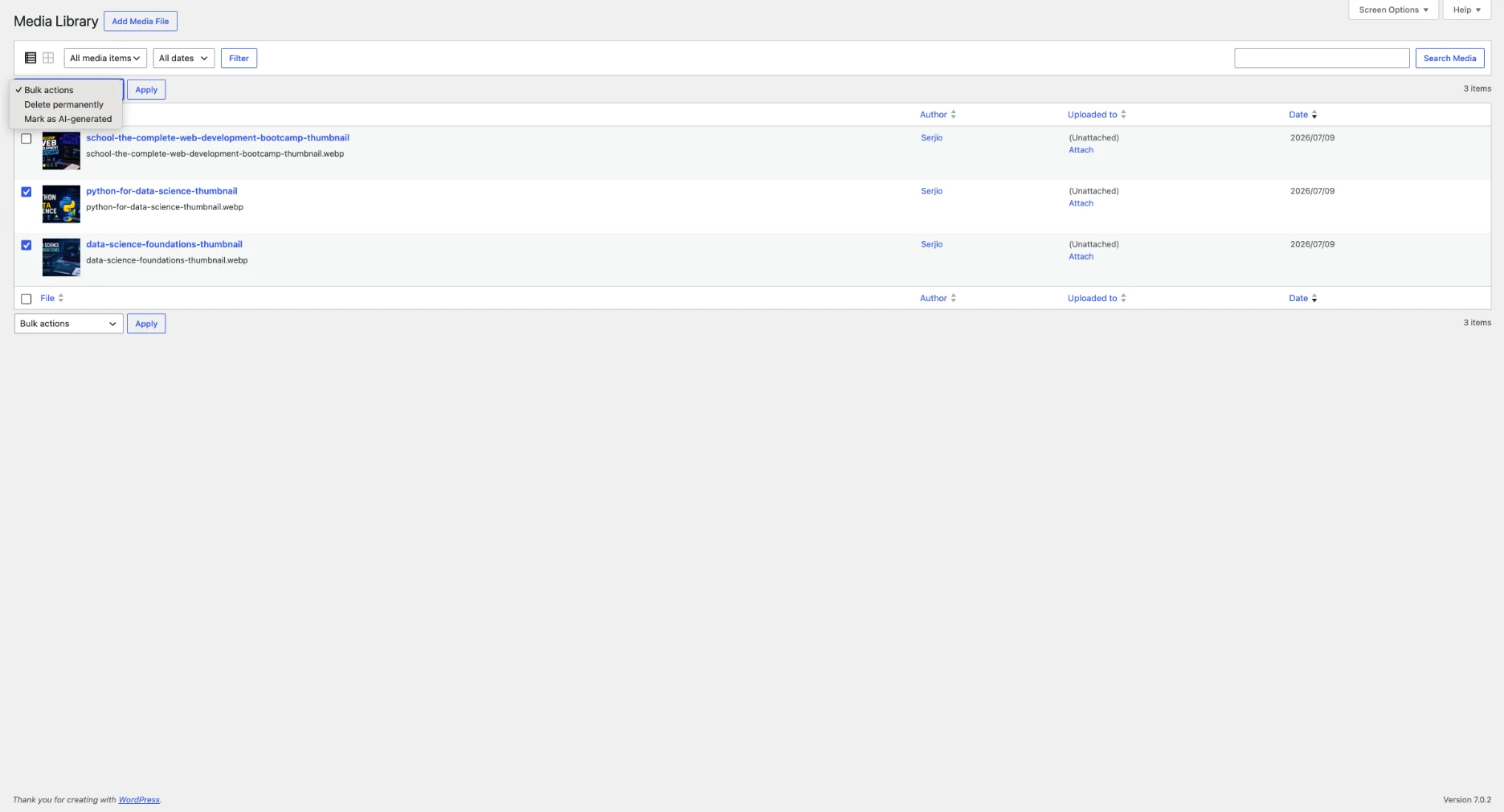
Existing libraries with hundreds of images are handled by a bulk action. Select, untick what shouldn’t be touched, run.

03 — Demo
In 40 seconds
Upload, label, inspect the metadata, run a bulk action.
04 — Audience
Who it’s for
Agencies and web studios
You run client sites and you keep getting the same question. One licence for 5 or 25 sites, consistent settings, one point of contact.
Online retailers
AI-generated product images are the most sensitive case. Bulk-process the whole catalogue; the label stays in the downloaded file too.
Publishers, blogs, freelancers
One site, plenty of images from Midjourney, DALL·E or Firefly. Set it up once and it keeps running.
05 — What’s included
Free and Pro
| Feature | Free | Pro |
|---|---|---|
| Label images one by one | ✓ | ✓ |
| Visible badge (CSS overlay) | ✓ | ✓ |
| Choose badge position | ✓ | ✓ |
| Custom notice text | ✓ | ✓ |
| XMP Digital Source Type | ✓ | ✓ |
| Per-image status indicator | ✓ | ✓ |
| Bulk-process the media library | — | ✓ |
| Full badge styling (colour, opacity, size, orientation) | — | ✓ |
| Burn text into the image | — | ✓ |
| Restore the original from a backup | ✓ | ✓ |
| IPTC metadata | — | ✓ |
| Notice in Alt, Title, Caption, Description | — | ✓ |
| Priority support | — | ✓ |
Free version
Visible badge and XMP metadata. Free forever, no sign-up.
Pro for 14 days
Every paid feature, no card required. Nothing is charged at the end: the plugin simply returns to the free features and all your settings stay in place.
06 — Pricing
Pricing
Every Pro feature is in every paid tier. The only difference is how many sites you cover.
Basic
1 site
€89
per year, plus VAT
For private individuals in Germany: €105.91 per year, including 19% VAT.
ChooseBusiness
5 sites
€249
per year, plus VAT
For private individuals in Germany: €296.31 per year, including 19% VAT.
ChooseAgency
25 sites
€499
per year, plus VAT
For private individuals in Germany: €593.81 per year, including 19% VAT.
ChooseUnlimited
unlimited
€799
per year, plus VAT
For private individuals in Germany: €950.81 per year, including 19% VAT.
Choose
Monthly billing available from €8.90 per month. 14-day trial, no card required, 14-day refund. In other EU countries the final amount with local VAT is shown at checkout before payment. When a subscription ends the plugin keeps working — only updates and priority support stop. Payments and invoicing are handled by Freemius, which is why VAT is charged under the rules of your country.
07 — Origin
Who’s behind it
Sergey Raevsky, building for the web since 2000, 300+ projects across 30+ countries. Based in Germany, with a working knowledge of the European requirements for websites — GDPR, legal notice, accessibility. AInsign came out of that practice.
08 — Questions
Frequently asked
Q1Does this replace the labelling done by the AI provider?
No. Providers such as OpenAI or Adobe label their own output — this plugin adds labelling on your site and to the files you serve from it.
Q2Badge or burn-in — what’s the difference?
The badge sits over the image and only appears on your site; the file is unchanged. Burning makes the text part of the image, so it survives being downloaded and shared.
Q3Can burn-in be undone?
Yes. The original is backed up to a private folder before any change. “Restore original” brings back the file and all its resized copies.
Q4Which formats are supported?
JPEG, PNG and WebP. IPTC metadata is only possible in JPEG, by format design.
Q5Does it work on images already uploaded?
Yes. The media library bulk action handles existing collections.
Q6What happens when the licence expires?
The plugin keeps working. Updates and support stop — which matters here, since requirements and standards keep moving.
Q7Is this legal advice?
No. AInsign is a technical tool. Whether and how you need to label is for your lawyer to determine.
Set it up today, not next week
Installation and basic setup take about ten minutes.
Buy a licence — from €89/yearAInsign is a technical tool for labelling images. It is not legal advice and makes no claim that your particular use meets any legal requirement. Sales and billing are handled by Freemius as Merchant of Record.